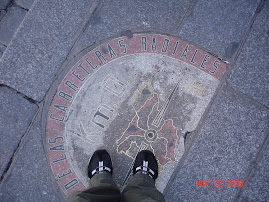
I really have come along way since the beginning of this class. I have enjoyed learning about the resources that the web has to offer in the perspective of my classroom. Actually, the amount of technology that actually can be integrated into the classroom is quite overwhelming. Each time I learned about something new, I ended up spending at least an hour searching through new links that I discovered.
I was often frustrated with things not working as "smoothly" as the introduction video showed, but I always made it through. Now, I have the skills to move through these sites a lot quicker. This will be helpful when I incoporate these tools in my classroom in the future.
When making new lesson plans, I will definately think of the tools we learned about in this class. I especially like my Delicious page as a personal resource for new sites that I find. I know that I can use Delicious when I need to find something to be inspired if I need something new in an old lesson. I am also looking forward to using pictures from Flickr and Slideshare to bring ideas to life for my students.
I am using the Blabberize site with my students on Monday, in addition to some downloaded YouTube Video clips. I really think the students are going to LOVE it!!! At the end of this unit, it is my plan to have the students make a review podcast. I have a lot of details to work out before we get there, but I am excited to try it out. It is my plan to post this to my wiki. Keep your fingers crossed for me that it works!
Overall, I learned that there are a lot of new tools out there that I can incorporate into my lesson planning and use with the students. I think this will improve my teaching and incorporate more variety into my lessons. I would definately sign up for the "Next 23 Things" class next year!! :)
PS- Did you notice I have a new visitor on my ClustrMap?!?!!? That red dot is on the west coast!! How exciting!! I wonder who that person was?!!!! Wow, it really brings it home that technology can connect people from all over the globe!!
Thursday, February 25, 2010

Numero veintidos
Welcome to the world of wikis!!! I have to admit, I didn't find the development of my wiki as easy as it seemed in the directions, but as always it worked out once I got the hang of it. I am still struggling with exactly how I want the students to use this site, but I have a great start!!
My page is: http://veintitrescosas.wikispaces.com/
I have added 5 pages already. My home page is just a basic intro. I would like to add pictures of my classes on this page. I imagine that I would also put main announcements on this page. I have also added a page for the activities I would like the students to be able to complete, a page for displaying student work, a page for homework (with a comment section that I imagine students could ask each other questions on difficult parts), and finally a "que interesante" page. On this final page, I imagine that I would put extra links or information about the Spanish language or culture.
With these ideas, I think that I could really set up a traditional blog. However, I do like the possibilities a wiki has to offer and I don't want to limit myself. Realistically, I can't see myself using both a blog and a wiki with my classes, so I am picking the the wiki to actually integrate into my classes this year.
I am still concerned with setting up the controls so that students have limited abilities on the site. Another teacher suggested that I get a few students to be my guinea pigs and I think I am going to do that. I want to feel very confident with the site when I actually use with my whole class. I am looking forward to playing with the site more!!
My page is: http://veintitrescosas.wikispaces.com/
I have added 5 pages already. My home page is just a basic intro. I would like to add pictures of my classes on this page. I imagine that I would also put main announcements on this page. I have also added a page for the activities I would like the students to be able to complete, a page for displaying student work, a page for homework (with a comment section that I imagine students could ask each other questions on difficult parts), and finally a "que interesante" page. On this final page, I imagine that I would put extra links or information about the Spanish language or culture.
With these ideas, I think that I could really set up a traditional blog. However, I do like the possibilities a wiki has to offer and I don't want to limit myself. Realistically, I can't see myself using both a blog and a wiki with my classes, so I am picking the the wiki to actually integrate into my classes this year.
I am still concerned with setting up the controls so that students have limited abilities on the site. Another teacher suggested that I get a few students to be my guinea pigs and I think I am going to do that. I want to feel very confident with the site when I actually use with my whole class. I am looking forward to playing with the site more!!
Monday, February 22, 2010
Numero veintiuno
Wow- some of these wikis look great!!
I was definately in awe of some of the wiki's that I came across. I was especially impressed by the classroom pages where students worked as a class to create a well-rounded collection of knowledge on a given topic. (Many of these even incorporated the podcasts, the slideshows, and other items we learned about in this class!)
In one Spanish classroom, the wiki topic was Dia de los Muertos. A few students posted information about the history, a few students prepared information on the prepartion for the event, a few compared the differences between Halloween and Dia de los Muertos, etc... There was even audio and graphics added to the site. In the end, there was a complete source about the holiday.
On another wiki, it appeared that each student logged onto the wiki during a class period and wrote a brief paragraph about what they had learned about Dia de los Muertos. On another day, they logged onto the site and read each others postings and commented on them. Some of the students made very interesting comments and corrections to information listed.
Since I have never looked into wikis before, this whole process seems a little overwhelming. The logistics are still unclear- how do I monitor all the postings? How do I keep track of what individual students have posted? How exactly do I evaluate their work on the wiki? How do I ensure that a student doesn't make an inappropriate posting? What if one student decides to be malicious and ruin the entire site? (I don't want to be cynical, but realistically, I have a few students who come into my mind when I think about letting them post to wiki.) At this point, I still have a lot of questions that need to be answered before I dive into a classroom wiki. I am definately intrigued though!!
I was definately in awe of some of the wiki's that I came across. I was especially impressed by the classroom pages where students worked as a class to create a well-rounded collection of knowledge on a given topic. (Many of these even incorporated the podcasts, the slideshows, and other items we learned about in this class!)
In one Spanish classroom, the wiki topic was Dia de los Muertos. A few students posted information about the history, a few students prepared information on the prepartion for the event, a few compared the differences between Halloween and Dia de los Muertos, etc... There was even audio and graphics added to the site. In the end, there was a complete source about the holiday.
On another wiki, it appeared that each student logged onto the wiki during a class period and wrote a brief paragraph about what they had learned about Dia de los Muertos. On another day, they logged onto the site and read each others postings and commented on them. Some of the students made very interesting comments and corrections to information listed.
Since I have never looked into wikis before, this whole process seems a little overwhelming. The logistics are still unclear- how do I monitor all the postings? How do I keep track of what individual students have posted? How exactly do I evaluate their work on the wiki? How do I ensure that a student doesn't make an inappropriate posting? What if one student decides to be malicious and ruin the entire site? (I don't want to be cynical, but realistically, I have a few students who come into my mind when I think about letting them post to wiki.) At this point, I still have a lot of questions that need to be answered before I dive into a classroom wiki. I am definately intrigued though!!
Numeros diecinueve y veinte
I really love the idea of podcasting!! As a teacher of a language, these are great tools to allow students to hear the language from someone other than myself. However, I have run into the same problem that I encountered every other time I have searched for these- finding appropriate ones for my classroom. I was excited to learn about the Educational Podcast Network and Podcast Alley, but I still had a hard time finding a site that fit into my curriculum.
I did finally come across some that I feel I could use, but the time factor really comes into play. [Finding the site, listening to all the podcasts (the one I found had over 30 podcasts in their database!!), making accompanying support documents, etc.. It really takes a lot of time. I'm confident that it would be a great support tool and the kids would like it, but it sure can take a while to prepare for classroom use.]
The two that I found most helpful were:
- Codyscuentos.com: This one has links to different fairy tales read in Spanish. Several of them even have the text so you can follow along as they are reading. I downloaded Los Tres Cerditos (The Three Little Pigs) and I found a kindergarten site that had clip art for this story. I pasted them into a PowerPoint presentation. I would like to put these pictures with the text and have the students listen to the story. There are many things I could do with this story- what comes to mind first is having students recognize psat tense verbs. While this usually comes up formally in Spanish II, I like to introduce it to my level I students as well. This would be a great vehicle to do so.
- NotesinSpanish.com: This one has links to several short Spanish lessons. There are two speakers in these podcasts and one of them is a native Spanish speaker. I liked the podcast about ordering tapas. In this one, they give common Spanish phrases needed for ordering tapas. The Spaniard also describes several common tapas that are ordered. This would fit in perfectly when I talk about tapas/ Spanish culture. I would want to make a worksheet to accompany this though. The worksheet would could have multiple choice questions or fill in the blanks for the students to complete while listening. The podcast itself is pretty long too- almost 30 minutes. I would either need to break it down to the most important parts or break it up over a couple days.
The idea that I found most inspiring was creating my own podcasts for the students in my classroom. In one of the examples, the teacher created a study session for his students before a test. I really like that idea. I think some kids would really benefit from this. I think what would be even better is for the students to come up with the study session information. If they produced it, it would be more meaningful to them. I would have to work out the technical aspects on exactly how that would work, but I think it is a possibility. This is definately making my brain churn!!!!
I did finally come across some that I feel I could use, but the time factor really comes into play. [Finding the site, listening to all the podcasts (the one I found had over 30 podcasts in their database!!), making accompanying support documents, etc.. It really takes a lot of time. I'm confident that it would be a great support tool and the kids would like it, but it sure can take a while to prepare for classroom use.]
The two that I found most helpful were:
- Codyscuentos.com: This one has links to different fairy tales read in Spanish. Several of them even have the text so you can follow along as they are reading. I downloaded Los Tres Cerditos (The Three Little Pigs) and I found a kindergarten site that had clip art for this story. I pasted them into a PowerPoint presentation. I would like to put these pictures with the text and have the students listen to the story. There are many things I could do with this story- what comes to mind first is having students recognize psat tense verbs. While this usually comes up formally in Spanish II, I like to introduce it to my level I students as well. This would be a great vehicle to do so.
- NotesinSpanish.com: This one has links to several short Spanish lessons. There are two speakers in these podcasts and one of them is a native Spanish speaker. I liked the podcast about ordering tapas. In this one, they give common Spanish phrases needed for ordering tapas. The Spaniard also describes several common tapas that are ordered. This would fit in perfectly when I talk about tapas/ Spanish culture. I would want to make a worksheet to accompany this though. The worksheet would could have multiple choice questions or fill in the blanks for the students to complete while listening. The podcast itself is pretty long too- almost 30 minutes. I would either need to break it down to the most important parts or break it up over a couple days.
The idea that I found most inspiring was creating my own podcasts for the students in my classroom. In one of the examples, the teacher created a study session for his students before a test. I really like that idea. I think some kids would really benefit from this. I think what would be even better is for the students to come up with the study session information. If they produced it, it would be more meaningful to them. I would have to work out the technical aspects on exactly how that would work, but I think it is a possibility. This is definately making my brain churn!!!!
Tuesday, February 16, 2010
Monday, February 15, 2010
Numero dieciocho
I am really, really excited about using Slideshare!! I enjoyed searching for presentations that were already created. I use powerpoint presentations a lot in my class, and sometimes I just want a little something extra. This website is a great place to start looking. Again comes the time factor though- I started playing around with the site last night and suddenly 2 hours had gone by! You always have to be mindful of the time you are spending.
Another good aspect to the site is that you can access the presentation from anywhere. Now, I can go to the computer lab at my school and still have access to a presentation. I won't have to worry about forgetting my jump drive or anything like that.
I am also excited about having my students place their presentations on this site. I occasionally have them create presentations and it is a pain to walk around and make sure that all of them are saved correctly. Then, if I want to look at them on another computer, I have to jump through some more hoops. With this program, I could have the students save to this site and I could pull it up from anywhere. I wouldn't have to worry about memory space on our computers and I wouldn't have to call my tech person to figure out where a kid's project went to!!! This is definately something I am going to investigate further!!!
Another good aspect to the site is that you can access the presentation from anywhere. Now, I can go to the computer lab at my school and still have access to a presentation. I won't have to worry about forgetting my jump drive or anything like that.
I am also excited about having my students place their presentations on this site. I occasionally have them create presentations and it is a pain to walk around and make sure that all of them are saved correctly. Then, if I want to look at them on another computer, I have to jump through some more hoops. With this program, I could have the students save to this site and I could pull it up from anywhere. I wouldn't have to worry about memory space on our computers and I wouldn't have to call my tech person to figure out where a kid's project went to!!! This is definately something I am going to investigate further!!!
Sunday, February 14, 2010
La Casa De Bart
Check it out!!! In order to actually be able to read the writing, you should watch in full screen mode. Muy creativo, no?
La Casa De Bart
View more presentations from Catalina Bohorquez.
Numero dieciseis y diecisiete
Tonight I learned about Google Docs. I can't believe I hadn't heard of this before. I think the idea of it is great!! I wasn't able to work find the 23 things document in my folder, but I uploaded some other things and played for a while. My colleagues and I are creating new curriculum this year. Uploading to Google docs would allow us to collaborate even though we are not physically at the same building!! I am definately suggesting this to my teammates.
I can't really imaging the students in my classes using it as much as the teachers talked about on the video. I don't have that many assignments that would require this type of collaboration, but never say never.
I also looked into other productivity tools. I thought the flashcard site would be perfect for my students, but I didn't really like it once I got there. I finally settled with the website bubbl.us. I decided to create a bubble chart that outlined the major concepts of my current unit. I left blank bubble for the students to fill in. I thought this would be a good graphic organizer for them to study with. I found it was not really user friendly and very time consuming. I think you can essentially do the same thing with inspiration, but without the "sharing" component. I will have to re-think how I could use one of the these sites. For now, they are not my favorite things that I have learned about. Maybe the bar was just set high with Google Docs.... :)
I can't really imaging the students in my classes using it as much as the teachers talked about on the video. I don't have that many assignments that would require this type of collaboration, but never say never.
I also looked into other productivity tools. I thought the flashcard site would be perfect for my students, but I didn't really like it once I got there. I finally settled with the website bubbl.us. I decided to create a bubble chart that outlined the major concepts of my current unit. I left blank bubble for the students to fill in. I thought this would be a good graphic organizer for them to study with. I found it was not really user friendly and very time consuming. I think you can essentially do the same thing with inspiration, but without the "sharing" component. I will have to re-think how I could use one of the these sites. For now, they are not my favorite things that I have learned about. Maybe the bar was just set high with Google Docs.... :)
Numeros catorce y quince
I have been investigating Delicious and I am liking it (my delicious site= senoritad). I continue to find new, useful sites. It can take time to find the tag words that work, but once you hit on something good it feels like a waterfall. Not only can you get the origial list of tagged items, but you can look at the personal lists of the people who liked that item. I have found quite a few new things in these personal lists!! I can see how this can be more effecient than just googling something. The numbers of people who like the site is also helpful in weeding out the good/ not so good sites.
Going back to my bloglines account was a different experience. For some reason, my bloglines account isn't as "easy" for me. I don't know what it is about it, but it isn't as user friendly for me. However, I do have to admit that it was much easier this time than the last time I checked my accounts. I remember the last time being overwhelmed by how many new posts I had. This time, I organized my links into different folders and it made that first page seem much easier to read. I could also be selective on which ones I wanted to look at- once clicked on the folder, I found that I really could scroll through the updates pretty quickly. I think the key is just keeping up on it. (Honestly though, I am still unsure if I can work into my routine.)
I did subscribe a delicious account to my bloglines. The tag I tried was "spanish resources". I am hoping that it updates with some good links. I think if I find success in my updates it will make me want to check back more often. Time is limited though and while I can see this being more effecient than other searches, it still takes time. Time will tell if I take to this or not. Keep your fingers crossed.
Going back to my bloglines account was a different experience. For some reason, my bloglines account isn't as "easy" for me. I don't know what it is about it, but it isn't as user friendly for me. However, I do have to admit that it was much easier this time than the last time I checked my accounts. I remember the last time being overwhelmed by how many new posts I had. This time, I organized my links into different folders and it made that first page seem much easier to read. I could also be selective on which ones I wanted to look at- once clicked on the folder, I found that I really could scroll through the updates pretty quickly. I think the key is just keeping up on it. (Honestly though, I am still unsure if I can work into my routine.)
I did subscribe a delicious account to my bloglines. The tag I tried was "spanish resources". I am hoping that it updates with some good links. I think if I find success in my updates it will make me want to check back more often. Time is limited though and while I can see this being more effecient than other searches, it still takes time. Time will tell if I take to this or not. Keep your fingers crossed.
Friday, February 12, 2010
Blabberize
I love the new technology I am finding!!! I came across the Blabberize program while using Delicious. (I am definately a big fan of using that site for searching new things!! Check it out if you haven't yet!!)
I am merging two different things here- a cute picture of my friends baby and a speaking project from my Spanish class!! One of my students is introducing himself. (This was a speaking test in our first unit). I think it gives it a funny twist!! What do you think?
I am merging two different things here- a cute picture of my friends baby and a speaking project from my Spanish class!! One of my students is introducing himself. (This was a speaking test in our first unit). I think it gives it a funny twist!! What do you think?
Thursday, February 11, 2010
Numero trece
Wow!! I love this idea. I feel like I have so many different places to put things on my computer that I do get a little "lost" when I am trying to find things. I have a really long favorites list and different folders for things, but storing your links on a main list with tags makes so much more sense. I especially like how you can access this from any computer. Sometimes I am at a different school when we are have CAT meetings. If something comes up, I could always log onto whatever computer is available and bring up my links.
I am really excited to see how the "social" part works. The video talked about being able to see what links other people have found to be helpful. I can see how this would also be helpful when looking for lesson specific ideas. Hopefully this endeavour turns out to be easy to use!!! Stay tuned!!
I am really excited to see how the "social" part works. The video talked about being able to see what links other people have found to be helpful. I can see how this would also be helpful when looking for lesson specific ideas. Hopefully this endeavour turns out to be easy to use!!! Stay tuned!!
Numeros once y doce
I can really see the benefit of looking at other blogs. You get new ideas and read inspiring comments. Leaving comments is fun. I have to admit, I get really excited when I see I have a new comment on my own blog. I always smile when I see it! This has helped changed my perspective on leaving comments. I used to just read them and think different things, but not actually post a comment. I thought nobody would really care what I thought. I am changing my mind. It doesn't really take that much time (they really make it easy for you) and I don't have to write a novel or anything.
I am still undecided on previewing the posts before they are published. I can see the benefit or it, but is it time consuming? Any thoughts?
I have also loved playing with the widgits. There are SOOO many out there, but it sure has been fun to load them onto my blog. I think these make a blog site interesting and unique. I can see how this would intrigue students if I were using a blogspot with them. It is a great place to post resources that they may need (like my currency converter or the weather map of a Spanish speaking location) or just fun things like the poll. As I have said in the past, it can just get time consuming if you don't know what you are looking for and just start sifting through the endless supply of random items. I think that is where visiting other blogs also comes in handy. You can get really great ideas for others!!!!
BTW- I figured out how to change the time stamp on my posts. Not that it matters to anyone else, but my time was always wrong. Turns out I was set up in a different time zone. I have fixed that and am all set now!! Yippe!!
I am still undecided on previewing the posts before they are published. I can see the benefit or it, but is it time consuming? Any thoughts?
I have also loved playing with the widgits. There are SOOO many out there, but it sure has been fun to load them onto my blog. I think these make a blog site interesting and unique. I can see how this would intrigue students if I were using a blogspot with them. It is a great place to post resources that they may need (like my currency converter or the weather map of a Spanish speaking location) or just fun things like the poll. As I have said in the past, it can just get time consuming if you don't know what you are looking for and just start sifting through the endless supply of random items. I think that is where visiting other blogs also comes in handy. You can get really great ideas for others!!!!
BTW- I figured out how to change the time stamp on my posts. Not that it matters to anyone else, but my time was always wrong. Turns out I was set up in a different time zone. I have fixed that and am all set now!! Yippe!!
Numeros nueve y diez
Wow- searching through YouTube was fun. I had looked through it for fun stuff before (the evolution of dance), but I hadn't really looked at it as a resource for educational material. I realized that I could actually find a descent video to use in my classroom fairly quickly. There are still a lot of low quality things you need search through, but the good stuff is really there. I found a true correlation between the number of views and the quality of the video. I know that won't always be the case, but it is something to keep in mind.
I had a little difficulty with the details- actually downloading it and embedding it into my blog, but I figured it out. Now that I have the procedure down, I will be able to do it quicker in the future. Since YouTube is a blocked site at school, it is important to download it to my own computer in order to use it in my classroom. There are TONS of sites out there to help with downloading, but I found the KeepVid site the easiest to use. The site is: keepvid.com.
I will definately keep this on the short list of research tools when lesson planning in the future.
I had a little difficulty with the details- actually downloading it and embedding it into my blog, but I figured it out. Now that I have the procedure down, I will be able to do it quicker in the future. Since YouTube is a blocked site at school, it is important to download it to my own computer in order to use it in my classroom. There are TONS of sites out there to help with downloading, but I found the KeepVid site the easiest to use. The site is: keepvid.com.
I will definately keep this on the short list of research tools when lesson planning in the future.
Evolution of Dance
This is one of my favorite YouTube videos!! I love the compilation of songs. You definately need to watch it if you haven't seen it. I bet you will be smiling and tapping your toes by the end!!
Want to Conjugate Verbs??
Check out this fun video!! You will definately be singing along by the end!!!!
Wednesday, February 10, 2010
Happy Snow Day

I did it!!! I couldn't figure out how to upload my cool jigsaw puzzle that I made with an image I uploaded to Flickr, but I just got it!!! What a great feeling!!! (These ice caves in Wisconsin is in honor of the snow day today!!)
Numeros seis, siete y ocho
I have heard about Flickr for a while now, but this was my first time actually investigating the site. There are tons of things you can do on it. Not only can you upload your own pictures, but you can search other images with different tags. As a teacher, I could download these images and use them in my lessons at school. Flickr provides a current selection of pictures and a WIDE variety of pictures to choose from. As a Spanish teacher, I searched for pictures of different countries and I loved what I saw. I will definately use this sources as I am planning upcoming lessons. Depending on the filters, I could also see the students using this to search for images. I think they would find this interesting.
I also liked how you could automatically print photos from Flickr and even create photo books. This site povides access to all the things I love to do with pictures. It is like one stop shopping. Taking it a step further, I played with the different image generators and had a lot of fun. I created a jigsaw puzzle of some ice caves in Wisconsin. I could see that being a lot of fun for us too!! Uploading the pictures was easy, but learning to navigate all the links from Flickr will take a while to get used to. I tried to post my jigsaw puzzle and it didn't work. I did get my memory game to come up though, so I guess I just need time to learn how to make it work.
I also liked how you could automatically print photos from Flickr and even create photo books. This site povides access to all the things I love to do with pictures. It is like one stop shopping. Taking it a step further, I played with the different image generators and had a lot of fun. I created a jigsaw puzzle of some ice caves in Wisconsin. I could see that being a lot of fun for us too!! Uploading the pictures was easy, but learning to navigate all the links from Flickr will take a while to get used to. I tried to post my jigsaw puzzle and it didn't work. I did get my memory game to come up though, so I guess I just need time to learn how to make it work.
Memory Game
Click on this link to play a game in honor of our snow day today!!!! Type SNOW into the search box and savor the fine memory of our fabulous snow day!
:: PIM PAM PUM :: memry
:: PIM PAM PUM :: memry
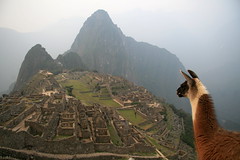
Overlooking machu picchu
I will soon be standing in the same place as the llama in this picture!!!!! I am so excited!!!!
Numeros cuatro y cinco
Setting up my bloglines took more time than I anticipated because of technical difficulty, but I got it now. I set up feeds for four different Spanish news sources. I loved looking for the RSS link on these different sites. It was exciting to know that they would be sending me updates.
However, checking back after just a few days, I already have over 200 links (is that the right word?). I can see how having a bloglines account it makes things easier to stay on top of things- the updates are all delivered to one place- but to say it saves you time is still misleading. You can still get sucked into spending a lot of time going through the updates. I also found the bloglines pages boring (no fun colors, graphics, etc.). This was the only other downfall that I had when reading my updates on bloglines. Aside from that, I am excited to use this new technology!!
However, checking back after just a few days, I already have over 200 links (is that the right word?). I can see how having a bloglines account it makes things easier to stay on top of things- the updates are all delivered to one place- but to say it saves you time is still misleading. You can still get sucked into spending a lot of time going through the updates. I also found the bloglines pages boring (no fun colors, graphics, etc.). This was the only other downfall that I had when reading my updates on bloglines. Aside from that, I am excited to use this new technology!!
Sunday, January 24, 2010
Numero tres
I just finished checking out some other cool blogs. Again, once you enter "blog world" time goes by VERY quickly. I was just looking around for almost an hour. There are a lot of possibilities out there. The two things I liked the best were the Clustr Map on the Teaching Learners with Special Needs blog. This shows where in the world everyone is who is following your blog. What a great visual!! This blog also showed me a blog page can be a great way to communicate professionally. There are a ton of resources out there and this is a way to connect to them.
I also loved the funny stuff on the Hobo Teacher's blog. I loved looking at the funny cartoons, pictures, and comments. I can see that if you used a blog with your classroom that this type of stuff can make it more interesting for them (and me!!)
I am also impressed with the blogs of my fellow classmates. They are inspiring me to add new things to my own (still boring) blog. But, the good news is that I have a new follower!! How exciting!! :)
I also loved the funny stuff on the Hobo Teacher's blog. I loved looking at the funny cartoons, pictures, and comments. I can see that if you used a blog with your classroom that this type of stuff can make it more interesting for them (and me!!)
I am also impressed with the blogs of my fellow classmates. They are inspiring me to add new things to my own (still boring) blog. But, the good news is that I have a new follower!! How exciting!! :)
Numeros uno y dos
Watching the video was inspiring. It got my brain going as to how I could incorporate some of these things into my classroom. However, setting up the blog brought me down to reality. While the actual process was "easy", I found myself getting sucked into trying to make my page look "cool". Two hours later I hadn't really accomplished anything significant. I know that I will eventually be able to navigate these pages faster with time, but I know it will be important for me to remember now to sweat the details so much. If I use a blog with my students (which seems like a cool idea!!) I will have to have a system to make it easy to use. Hopefully I will learn how to do this in the next set of lessons.
Bienvenidos!!!
Welcome to my blog!!! I started this blog as a part of a technology class through my school district. I am excited to learn more about how to add to this blog. Although it is sparse right now, I know that one day I will have a blog with a lot of cool stuff on it!! I did add a poll at the bottom though. Please take a moment to vote. Thanks!!!
Subscribe to:
Comments (Atom)